
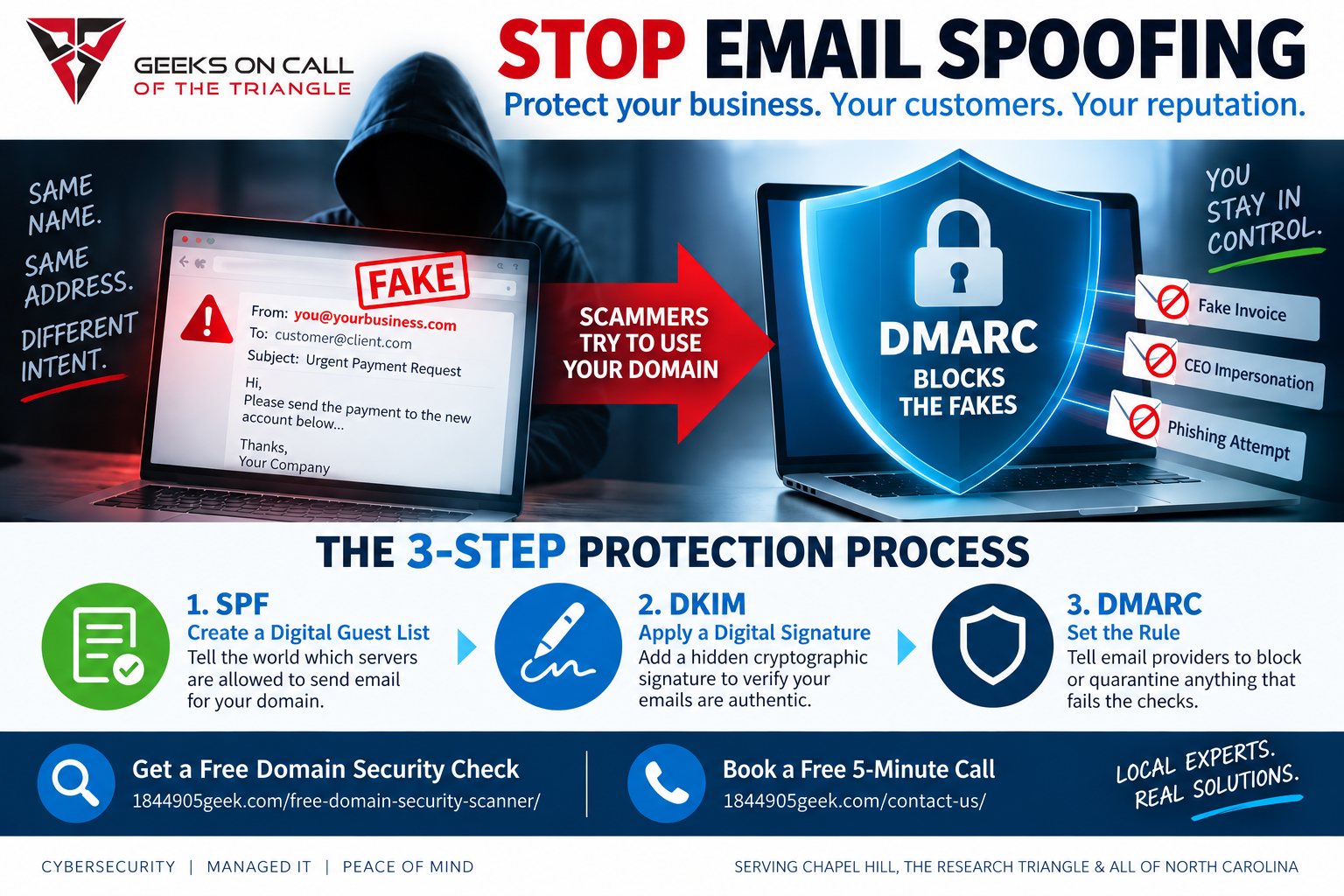
To stop email spoofing, you must update your domain's hidden security settings to explicitly state which specific servers are authorized to send messages on behalf of your business. Once these settings are configured, you must instruct receiving email providers to automatically block or quarantine any message that fails this identity check. Making these technical adjustments to your web domain is the only permanent way to lock out scammers and protect your company's reputation.
It is incredibly frustrating to find out that a criminal is using your exact business name and web address to scam people. You might only discover it because an angry customer calls to ask why you sent them a weird invoice, or because your own inbox is suddenly flooded with bounce-back messages for emails you never wrote. The worst part is that your internal computers and actual email accounts usually are not hacked at all. Instead, scammers are simply exploiting an old flaw in how the global internet works, which allows them to write your web address in the return section of their messages, just like someone writing a fake return address on a paper envelope.
To fix this problem, you need to put a digital lock on your company web address so that nobody else can use it. The ultimate tool for this job is called DMARC. In plain English, DMARC is a security rule you add to your web domain that tells the rest of the world exactly how to spot a fake email from your company and instructs them to throw the fakes directly into the trash. When you combine this rule with two other background verifications, you build an invisible security wall around your brand.
For small business owners and busy office managers across North Carolina, dealing with this issue can feel like an overwhelming distraction from daily operations. Whether you are running a boutique agency right here in Chapel Hill or managing a growing tech services firm near Research Triangle Park, your digital identity is the lifeblood of your customer relationships. If clients stop trusting the messages that appear to come from your office, your revenue and professional credibility can plummet overnight.
Fortunately, you do not need an advanced engineering degree to understand how to fix the vulnerability. The root of the problem lies in the fact that the internet was originally designed on a system of complete trust. Decades ago, nobody anticipated that malicious actors would weaponize email to steal data or trick people into wire transfers. Because of this open design, anyone can use a basic mail server to blast out millions of messages using whatever sender address they want.
To permanently shut this down, you or your technology partner must implement a three-step verification process on your web domain management page.
First, you must create a digital guest list. This is a simple text record added to your domain settings that names every single service allowed to send mail using your address. If you use Google Workspace or Microsoft 365, they go on the list. If you use a payroll service or a marketing platform to send newsletters, those must be added too. When another mail system receives a message claiming to be from you, it checks this list. If the sender is not listed, the message looks highly suspicious.
Second, you must apply a digital signature to your outgoing mail. Think of this like an wax seal on an official document. Your mail server automatically attaches a hidden, unique cryptographic signature to every single message you actually compose. The receiving server uses a public key listed on your domain registry to verify that the seal is authentic and that the message contents were not altered during transit.
Finally, you apply the master rule we mentioned earlier to tie it all together. This rule acts as the manager standing at the door. It tells external systems precisely what to do if an email arrives pretending to be you but fails the digital guest list or the digital signature test. When you first activate this rule, you usually set it to monitoring mode so you can see if any legitimate services were accidentally left off your guest list. Once you confirm everything is clear, you change the policy to strict enforcement, telling the world to completely reject the fakes.
Taking these steps changes the entire dynamic of your email security. Instead of playing defense and constantly apologizing to confused customers, you are taking control of your domain. Scammers will quickly realize that their fake messages are being deleted before they ever reach an inbox, causing them to abandon your web address and look for an easier, unprotected target.
If you are feeling stressed out by spoofing and just want a definitive answer on whether your business domain is currently vulnerable to these attacks, you do not have to guess. You can easily check your current protection status right now. We invite you to get a free domain check at https://www.1844905geek.com/free-domain-security-scanner/ to see exactly where your security stands, or you can book a free five minute call at https://www.1844905geek.com/contact-us/ to talk through what is happening with a local expert who can help you fix it.
Elmer Hill, PMP
CEO and President
Geeks on Call of the Triangle